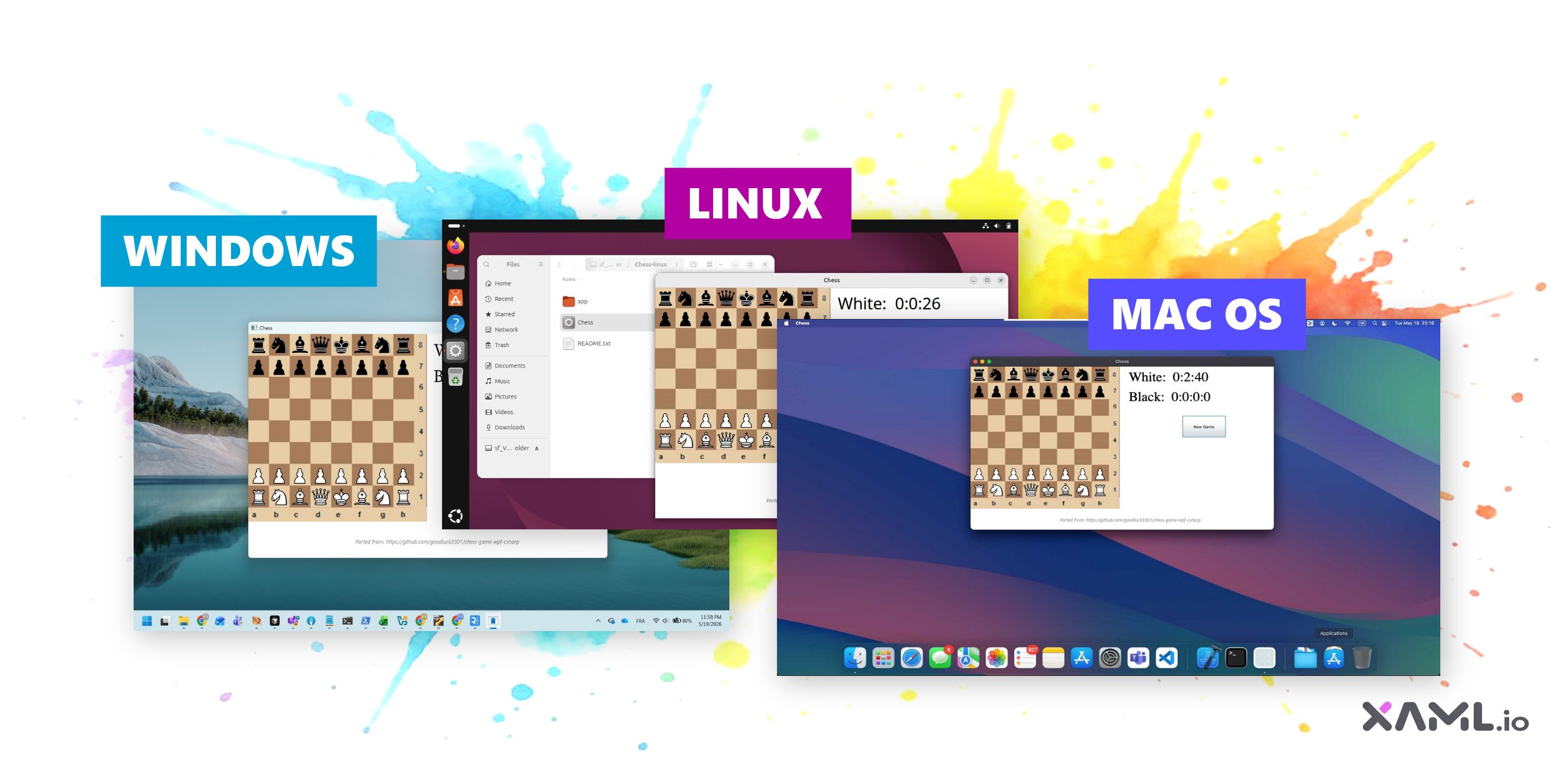
What if you could turn a C#+XAML project edited in your browser into a native Windows, macOS, or Linux desktop app, without leaving the browser, and without your code ever touching a server?
That’s what XAML.io v0.7 can now do. Click Publish, pick a platform, and a self-contained .exe, .app bundle, or Linux executable lands in your Downloads folder in well under a minute on a modern laptop. Everything runs in your browser tab: the compilation, the packaging, and even the Apple Mach-O ad-hoc code-signing pass for macOS bundles.
Preview status. This feature is in Preview / Alpha in XAML.io v0.7 (May 2026). Expect rough edges, occasional breakages, and changes between releases. We’d rather ship the rough version and iterate with you than wait for everything to be perfect. Bug reports and “this is missing X” notes are both welcome.
New to XAML.io? XAML.io is a free, browser-based IDE for building .NET applications using C# and XAML. It includes a visual drag-and-drop XAML designer with 100+ controls, a code editor, and in-browser .NET compilation via WebAssembly. No installation, no signup required. It’s built by Userware and powered by the open-source OpenSilver framework. Try it →
How it works
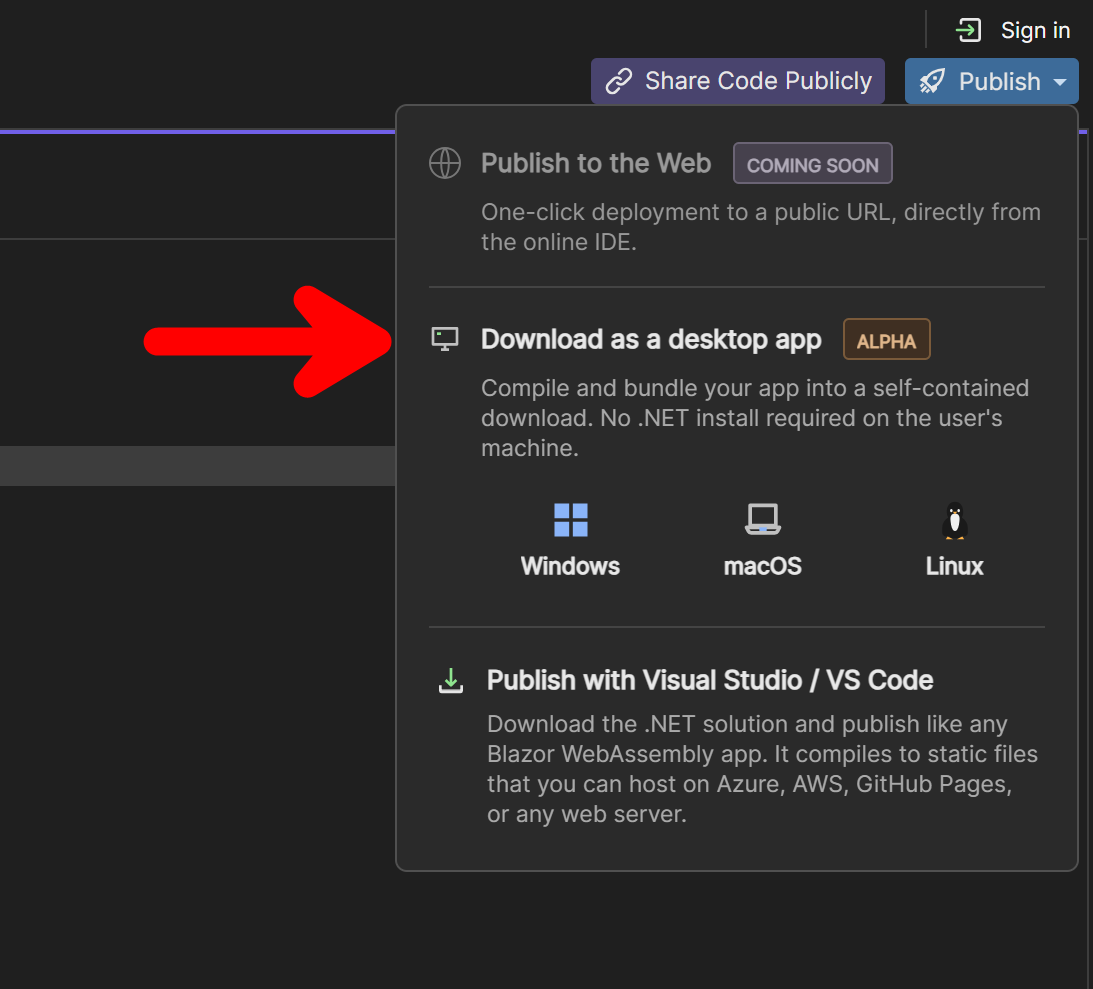
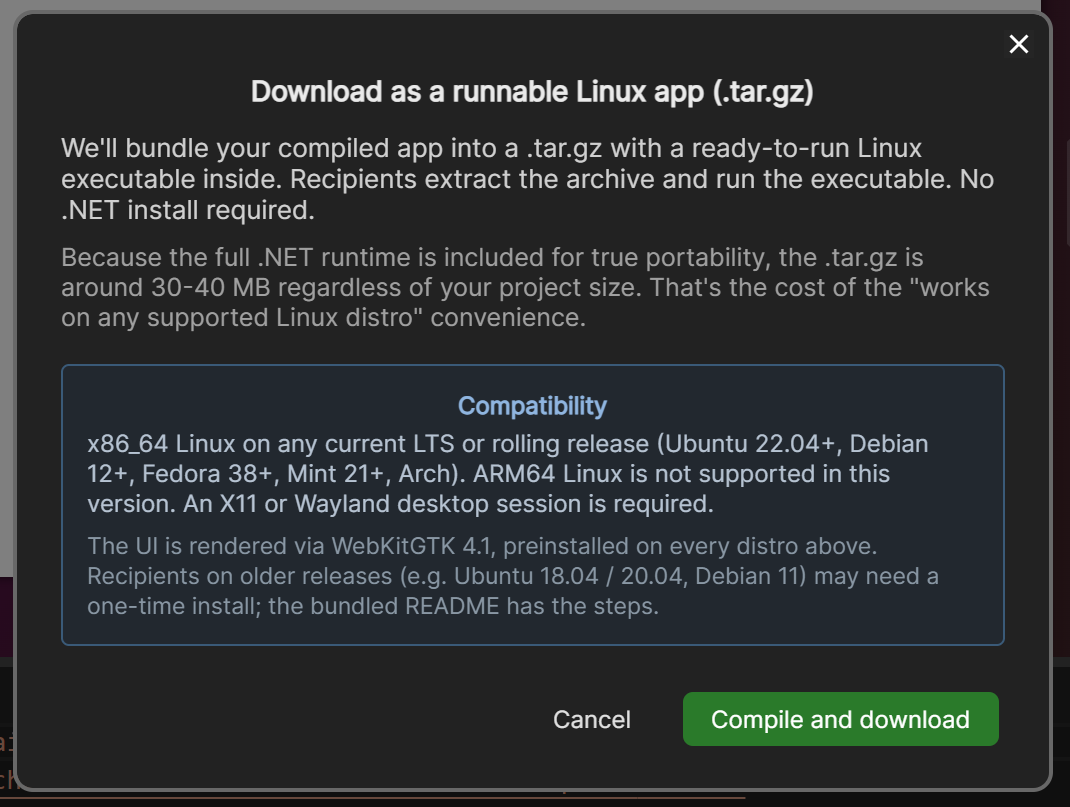
In XAML.io’s title bar, the Publish dropdown now has a “Download as a desktop app” section with three buttons inside it: one each for Windows, macOS, and Linux. Click a button and a dialog walks through what you’re about to get (format, size, first-launch caveats), then the publish pipeline runs locally in your browser tab. The browser’s native download dialog handles the rest.
There’s no signup. There’s no backend compile queue. The first time you publish for a given OS, the browser fetches a small per-platform launcher template (~30 MB, cached after first publish), assembles it with your compiled assemblies, and hands the result off as a download.
What you get on each platform
Windows
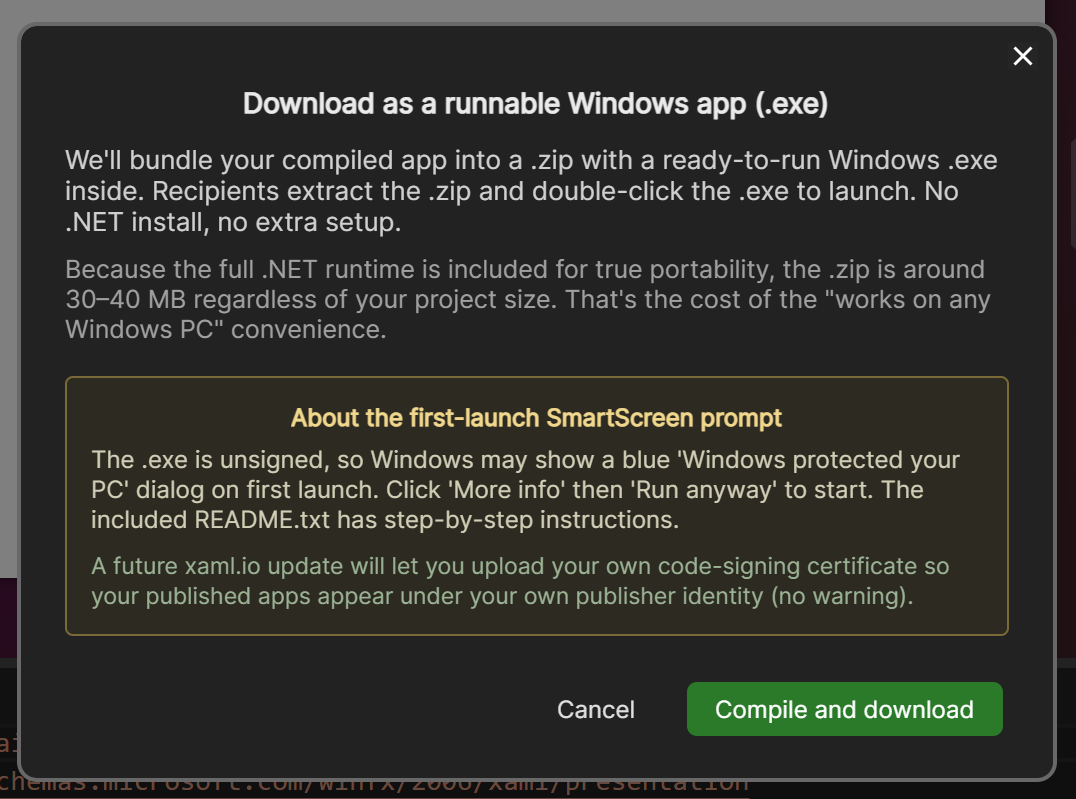
A self-contained .exe packaged in a .zip alongside an app/ folder (your compiled assemblies, sidecar DLLs, and resources) and a README.txt. Recipients extract the archive and double-click the .exe. No .NET install required on the recipient’s machine.
Windows SmartScreen will show a “Windows protected your PC” dialog on first launch because the .exe is unsigned (we haven’t yet shipped support for user-supplied code-signing certificates). The bundled README.txt has the “More info → Run anyway” bypass steps.
macOS
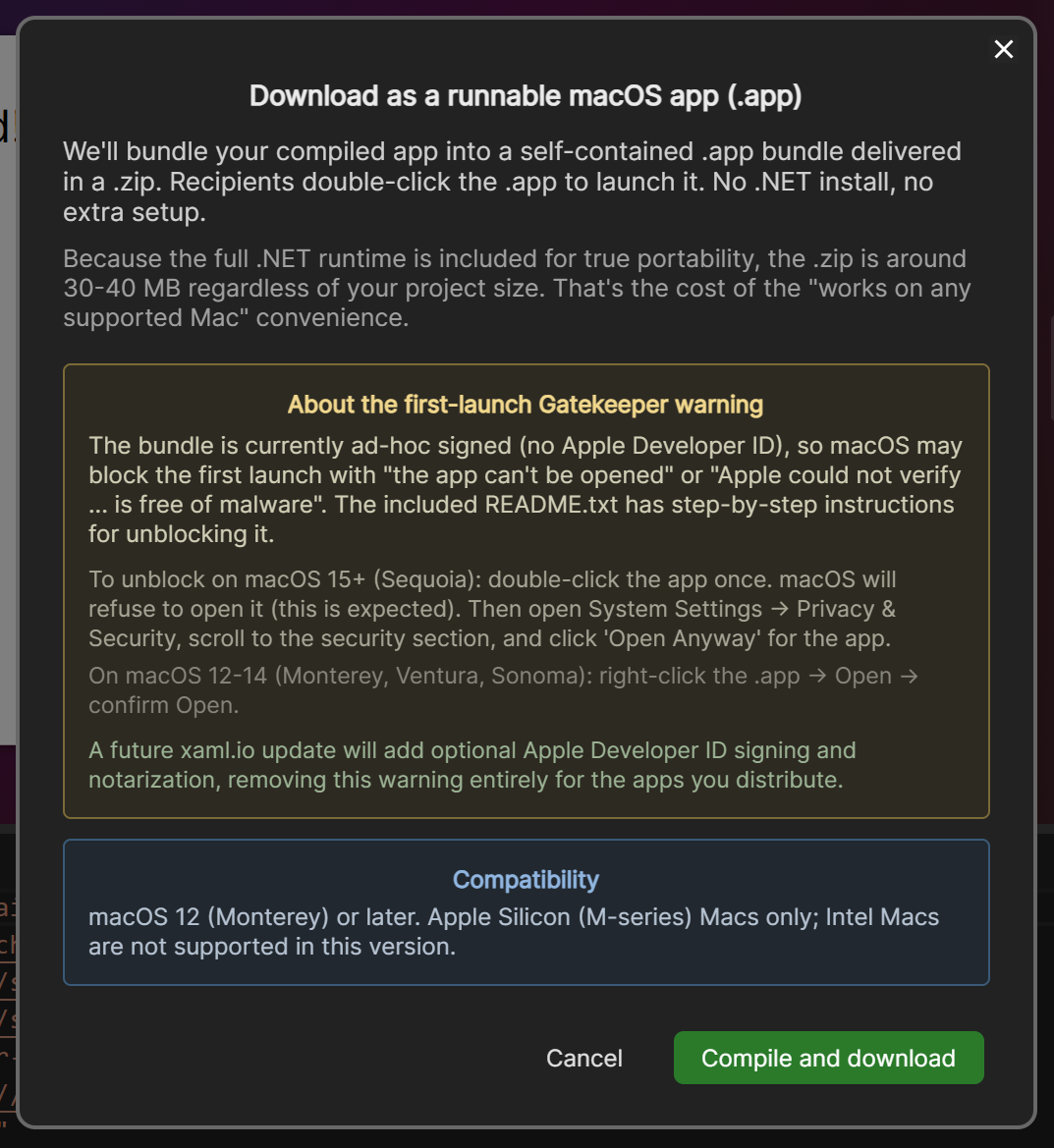
A self-contained .app bundle inside a .zip. The bundle is ad-hoc signed client-side as part of the publish pipeline (more on how that works below). Because there’s no Apple Developer ID involved, macOS Gatekeeper still prompts on first launch, but the bundled README.txt has the right-click → Open path for macOS 12-14 (Monterey, Ventura, Sonoma) and the System Settings → Privacy & Security → Open Anyway path for macOS 15 (Sequoia).
Apple Silicon (arm64) only for now. Intel Mac support is on the roadmap.
Linux
A self-contained ELF executable in a .tar.gz. Recipients extract the archive and run the executable. The UI is rendered via WebKitGTK 4.1, which ships preinstalled on every current LTS or rolling release (Ubuntu 22.04+, Debian 12+, Fedora 38+, Mint 21+, Arch). x86_64 only for now.
These are real native desktop apps
Same project, three OSes, three native processes:
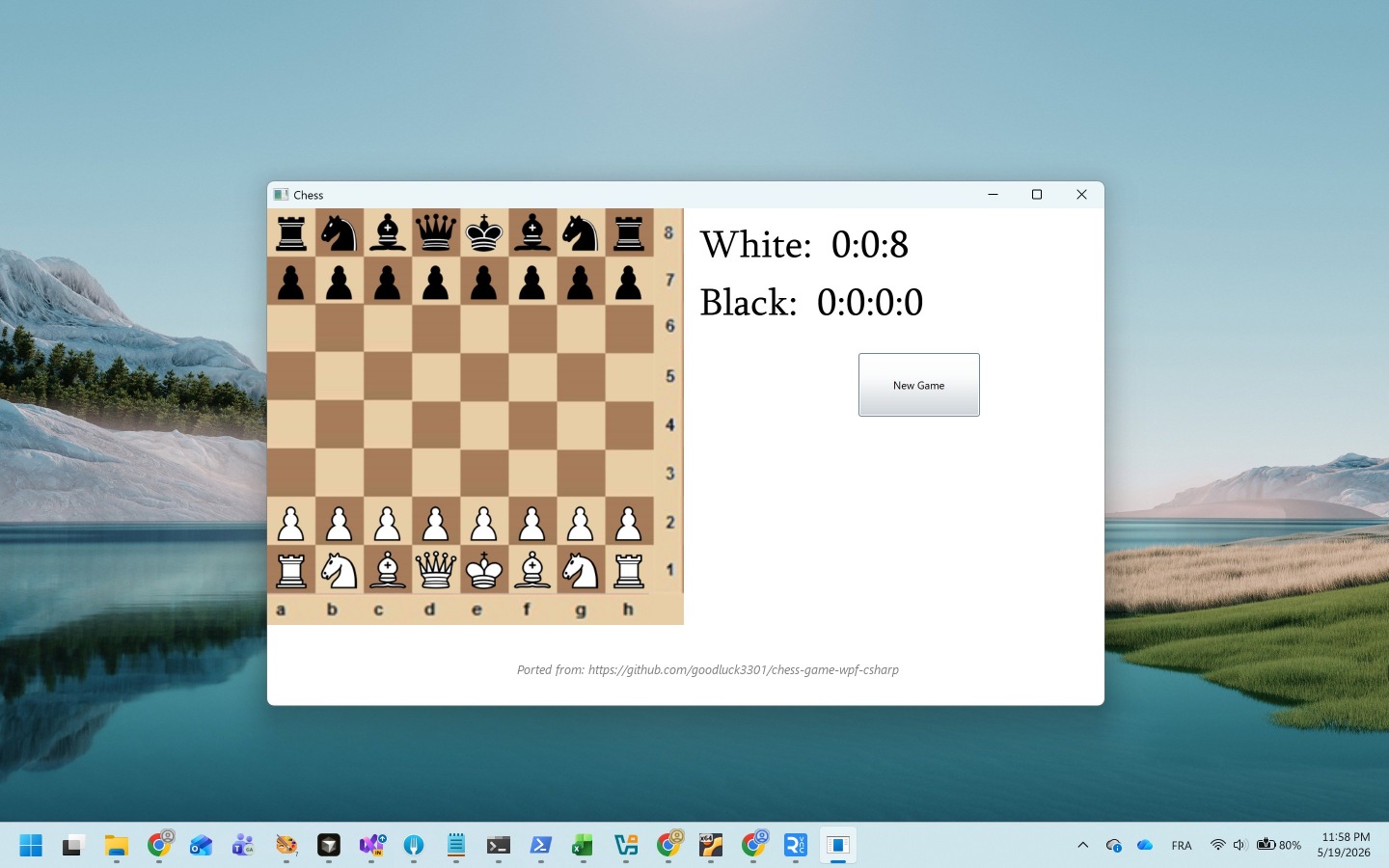
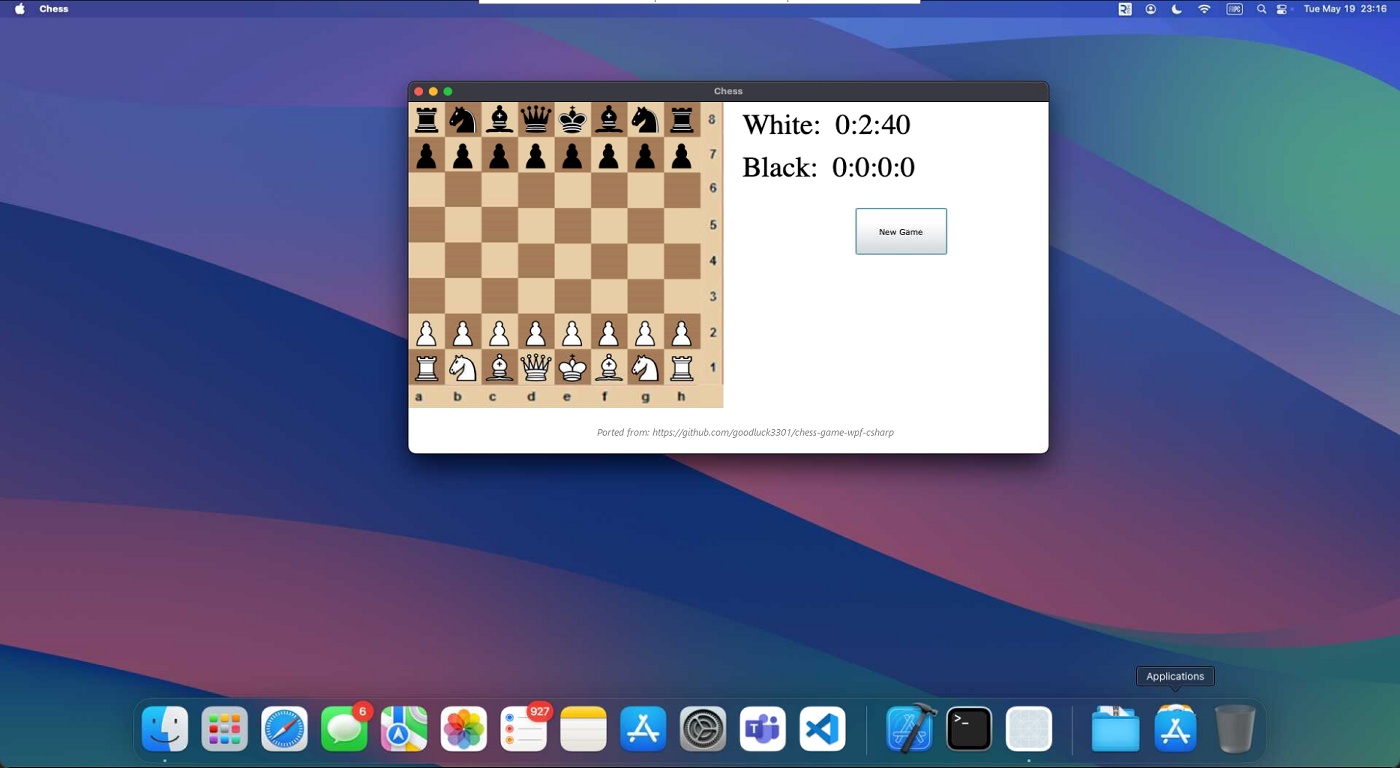
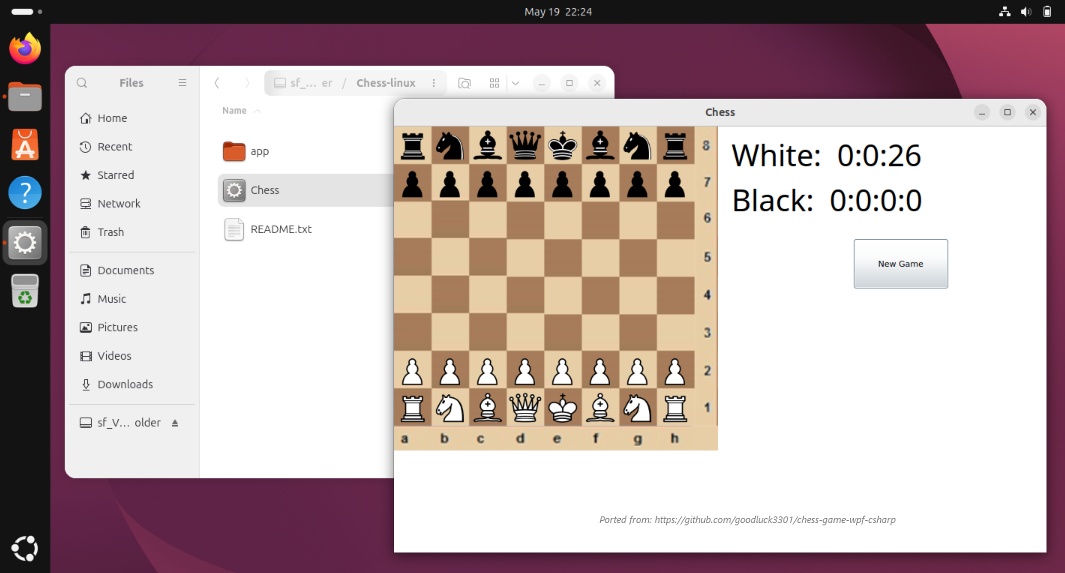
The downloaded artifact is a real native .NET process, not a packaged web page or a WebAssembly container. Your C# runs as native code on the recipient’s machine via the .NET 10 runtime (JIT-compiled, in-process, with full access to threading, sockets, file I/O, and P/Invoke), the same execution model as a WPF or WinForms app.
The rendering model is different: XAML.io builds OpenSilver apps. At build time, OpenSilver’s XAML compiler emits C# that knows how to construct the visual tree. At runtime, that C# runs, and each OpenSilver control attaches its underlying DOM element to the document: a TextBox becomes an actual <textarea>, an Image becomes an <img>, a Path becomes an <svg> (see the v0.6 deep dive for the long version). In the published desktop app that DOM lives inside the OS’s built-in WebView (Edge WebView2 on Windows, WKWebView on macOS, WebKitGTK on Linux), embedded into the .NET process via Photino and driven by the OpenSilver runtime directly (no Blazor WASM in the desktop app; that’s IDE-only). So: native .NET execution, DOM-based UI rendering, no bundled browser engine, no WASM at runtime.
Reactions so far
“Fucking hell this is really getting so much better, thanks a whole lot to the team!!”
— Infinite_Track_9210 on Reddit (source)
Under the Hood
There are four pieces worth pulling apart, because each one is the kind of thing that’s often assumed to need a backend.
1. The packaging pipeline runs entirely in your browser tab
No backend compile step. No server upload. No build queue. When you click Publish, the browser:
- Compiles your C#+XAML project to .NET assemblies using the same in-browser Roslyn that powers XAML.io’s Run button (see our earlier post on in-browser .NET compilation).
- Fetches a per-OS launcher template from XAML.io’s CDN. The template is a pre-built Photino app for that platform, bundled with the .NET runtime. It’s cached after first publish, so subsequent publishes for the same OS skip this step.
- Assembles your compiled assemblies + a small
manifest.json+ resources into the launcher’s expected sidecar layout, on an in-memory filesystem (Emscripten’s MEMFS, the same virtual FS Blazor WebAssembly uses). - Re-packs the result into the right archive format (
.zipfor Windows and macOS,.tar.gzfor Linux) with the correct executable bits, then hands the byte array to the browser’s native download dialog.
Your code never leaves your machine. The only network traffic during a publish is the one-time launcher-template fetch, which is the same pre-built bytes for everyone; the launcher knows nothing about your project.
2. Native .NET execution, DOM-based rendering
This is the part that surprises people, so it’s worth being explicit about: the WebAssembly part is only the IDE itself. The desktop apps it produces are real native .NET 10 processes. Your C# is JIT-compiled by the runtime and runs in-process, with the same execution model as a WPF or WinForms app.
The UI is rendered as real DOM elements (OpenSilver’s design choice; see the v0.6 deep dive), displayed inside the OS’s built-in WebView via Photino. In the published desktop app the OpenSilver runtime is loaded directly by Photino through the OpenSilver.Photino bridge: there’s no Blazor WebAssembly intermediate at runtime, and no client-side compilation either (that’s all IDE-only).
That separation matters in two practical ways:
- No bundled browser engine. Photino uses the OS’s built-in WebView (Edge WebView2 / WKWebView / WebKitGTK) rather than bundling Chromium the way Electron does. That keeps the download size to roughly the cost of the .NET runtime alone.
- C# / .NET libraries work the same as on any desktop .NET process. All the things WebAssembly normally sandboxes away (file I/O, sockets, threading, P/Invoke, native interop) work normally in the published app, because it’s a normal .NET process. Your code can do things the IDE itself can’t.
3. Even macOS ad-hoc code-signing happens client-side
This was the trickiest part to get working. Apple’s Mach-O format and the CodeDirectory hashing dance that produces a valid .app bundle signature are normally handled by codesign, which is a macOS-only command-line tool. To make publishing a .app from the browser work without a server-side signer, and without requiring you to be on a Mac, we needed an in-WebAssembly implementation of the signing pass.
The answer: we pulled the Mach-O writer and CodeDirectory hasher out of Filip Navara’s CodeSign / Melanzana, trimmed them to the parts we actually use, and run the ad-hoc signing pass entirely in the browser’s WebAssembly runtime. The bundle’s Mach-O binary is re-hashed, the _CodeSignature/CodeResources plist is regenerated, and the LC_CODE_SIGNATURE load command is rewritten. All of that happens on MEMFS, in C# compiled to WASM. The output is a valid ad-hoc signed bundle that Gatekeeper will accept (with the standard first-launch prompt that ad-hoc bundles always trigger).
The Melanzana subset is lazy-loaded: it ships as a separate ~500 KB compressed assembly that’s only fetched the first time you click Download as a macOS app. Windows-only and Linux-only publishers never download those bytes, so the IDE’s first-paint payload is unchanged for them.
Honestly, signing a macOS app from inside a browser tab is the kind of thing we’d have called impossible. Until we got it working.
4. File sizes
The launcher is a .NET 10 self-contained, single-file deployment with compression enabled (EnableCompressionInSingleFile=true) and trimming deliberately off (PublishTrimmed=false). Trimming is off on purpose: the launcher loads your compiled assemblies via Assembly.Load(byte[]) and the trimmer cannot reason about that. Compression brings an untrimmed self-contained .NET 10 app under 40 MB; without it, the same artifact lands closer to 60-80 MB.
| Platform | Compressed download | What’s inside |
|---|---|---|
| Windows | ~30-40 MB .zip | Single-file .exe with the .NET 10 runtime + OpenSilver runtime + Photino bridge bundled inside, alongside an app/ folder with your compiled assemblies and a README.txt. |
| macOS | ~30-40 MB .zip | Ad-hoc-signed .app bundle following the same layout as Windows. Apple Silicon (arm64). |
| Linux | ~30-40 MB .tar.gz | Single-file ELF executable with the same internal layout. x86_64. |
Sizes don’t balloon to Electron’s ~150 MB+ territory because Photino uses the OS’s built-in WebView rather than bundling Chromium. You pay for the .NET runtime, not for a browser engine.
The floor stays flat across platforms because the .NET runtime is the dominant cost. Project assets (images, fonts, media, embedded resources) add to that linearly.
Limitations and what’s missing
We want to be upfront about what isn’t there yet:
- Preview / Alpha in XAML.io v0.7 (May 2026). Behavior, UI, and the on-disk layout of the produced artifacts may change between releases. We’d rather ship the rough version and iterate with feedback than wait for everything to be perfect.
- No publisher-identity signing or notarization. Apps are unsigned in the Apple Developer ID / Windows Authenticode sense, so first-launch Gatekeeper and SmartScreen warnings still apply. Support for user-supplied code-signing certificates is on the way; for macOS, apps distributed via the web also need Apple’s notarization step for the smoothest first-launch experience, and we’ll wire that up alongside cert support. Until then, the bundled
README.txtwalks recipients through the one-click bypass for each OS. - Architecture coverage is partial. macOS publish is Apple Silicon (arm64) only. Linux publish is x86_64 only. Intel Macs and Linux ARM64 are on the roadmap.
- Linux distro floor. Modern distros (Ubuntu 22.04+, Debian 12+, Fedora 38+, Arch, Mint 21+) ship WebKitGTK 4.1 preinstalled and run the published app with no setup. On older releases (Ubuntu 18.04 / 20.04, Debian 11) recipients may need a one-time
apt install libwebkit2gtk-4.1-0or equivalent. The bundledREADME.txthas the per-distro commands. - Publish is best on desktop browsers. The packaging pass uses the WebAssembly heap heavily; mobile browsers may run out of memory on larger projects. Editing and running on mobile is fine, as before.
What’s coming next
| Feature | Description |
|---|---|
| User-supplied code-signing certificates | Upload your Apple Developer ID or Authenticode certificate; published apps then ship with publisher-identity signing and skip the first-launch warning entirely. |
| Broader CPU coverage | macOS Intel (x86_64) and Linux ARM64 publish targets. |
| One-click web deployment | Already on the v0.6 roadmap; the desktop publish flow is the local-distribution side of the same story. |
Suggest or vote on features at feedback.xaml.io, ask questions on the forums, or contact us directly.
Try it
Open xaml.io, build something, click Publish, pick a platform. In well under a minute on a modern laptop you’ll have a real native desktop app you can hand to anyone with that OS.
xaml.io | Free. No install. No signup required.